




Formate eVo Software
Formate eVo — The efficient way to create professional business documents.
Learn More About Formate eVo Software
Take Full Control of Your Business Data
Formate eVo gives organisations real control over their business documents and data, regardless of the ERP or business system in use.
From invoices and purchase orders to shipping manifests, tickets, PDF documents, Excel worksheets and barcoded labels, Formate eVo transforms raw data into professional, branded, customer ready output. It can also create structured data exports — including JSON, XML, EDI, CSV, and ZIP — enabling you to automate, share, and integrate business-critical information with total flexibility.
Formate eVo works 24 x 7 automating document and data handing tasks and never asks for a pay raise

Works with Virtually any ERP System
Total Flexibility
Formate eVo is built to connect with virtually any ERP or business system (from SAP to Sage), so it fits right into your existing setup. It can capture information from many different sources — including APIs, print files, mobile forms, emails, EXCEL, XML, HTML, JSON, CSV, PDFs, ZIP archives, and even plain text files.
Once your documents or data are ready, Formate eVo can deliver them however you choose — as printed pages, PDFs, emails, XML or JSON files, ZIP archives, API calls, or directly into your document management system or database.
Straightforward Licensing
Simple, Transparent Licensing
Forget the complex licensing models that take hours to untangle. With Formate eVo, it’s straightforward: one server license gives you unlimited flexibility.
From a single Formate eVo server, you can run UNLIMITED input and output queues across any data type!
For example, one Formate eVo server could simultaneously capture data from an ERP system, email, and watch-folders, process countless documents or data packets, and deliver them to as many destinations as you need—whether that’s printers, PDFs, XML files, or a document management system.

Transforming Ideas into Reality
Anyone Can Create Formate eVo Projects
Formate eVo’s intuitive layout design environment makes it easy to create consistent, professional-looking documents that align with your brand. Using the low-code development dashboard, you can control exactly what appears on each document — from conditional templates to specific elements like logos, promotional messages, QR codes, terms & conditions, or clickable URL links.
Whether you're tailoring communications by customer, product, or region, Formate eVo gives you the flexibility to dynamically personalise every document with precision and ease.
Custom Connections Made Easy
Integrate Anything, Anywhere
Need something more specific? Formate eVo Plugins let you quickly create tailored connections (allowing execution of a .NET compiled library) to your environment, adding extra capabilities and integrations when you need them. If you have .NET skills in-house you can write your own plugins - if not, we can write them for you.
If you have a specific environment you need to connect to and you're not sure if Formate eVo will work for you, please contact us and we'll be happy to help.

Low-Code Development
Anyone Can Create Formate eVo Projects
Formate eVo comes with its own built in low-code scripting language that lets you go beyond the standard settings and options. This means you’re not just limited to what you can set up through menus – you can create custom instructions that allow the system to make decisions, repeat tasks, and handle more complex jobs, just the way you need.
For example, there are scripts to control creating a PDF, which allow you to set a naming convention, add pages to it, create a password, insert a URL, add a barcode, insert text.....and much more.

Working with Any Document or Data Type
Here's a list of all the Formate eVo scripting categories:
Arrays
Batch Printing
Build Text
Date/Time
Direct Printing
Execution
Excel Creation/Editing
External Data
File Manipulation
Form Type Properties
Formatting
JSON Files - Reading
Miscellaneous
MS Documents (Excel, Word)
Page Content
Pages, Jobs and Streams
PDF/Custom Document Creation
PDF Editing
PDF Printing/Conversion
Printing
Process File
Spreadsheet Creation/Editing
Strings
Text Files
Web Services/Plugins
XML Files - Reading
XML Files - Writing
Word Creation/Editing
If you have a specific application and you're not sure if Formate eVo will work for you, please contact us and we'll be happy to help.
Realtime Information
Monitoring, Analytics & Reporting
Formate eVo provides dashboards and apps to monitor processes, review documents before despatch, track volumes and timings, and diagnose issues — helping users continuously optimise output operations. In addition, custom reports can easily be created using the low-code development environment.

How Formate eVo Licensing Works
Deployment & Licensing Options
Formate eVo software is available as an on‑prem solution or cloud hosted - in both instances it requires a suitable MS Windows host server.
Licensing flexibility: perpetual on‑prem license, or monthly subscription model. Free trial or time limited versions are available.
License Types:
Formate eVo Server - this option allows a customer to run a specific application(s) on up to 2 live Formate eVo Servers, but doesn't include the development dashboard to create new applications or makes changes. This is ideal for a company which want to quickly and cost effectively solve a problem without having to bring development and support in-house.
Formate eVo Enterprise - this allows an organisation to run up to 6 live servers and includes the development dashboard to allow the design of Formate eVo applications - this option is ideal for companies with IT skills who want to develop and support their applications internally - training is recommended for this option.
Please contact us for detailed pricing, or to discuss your application.
Who Uses Formate eVo
Is Formate Right For My Business
Typical users for Formate eVo include; SME to large corporates, focused on streamlining back-office tasks such as invoicing, statements, purchase orders, customer correspondence, or barcode logistics labels.
Formate eVo is well‑suited to industries such as finance, manufacturing, healthcare, logistics and ERP driven environments where print/XML output needs formatting into customer‑ready documents with automation.
Migrating to Formate eVo
If you’re still relying on a legacy output management solution (such as K-Print, FormScape, Transform, CreatePrint, or PlanetPress), or using a restrictive report writing tool, switching to Formate eVo will almost always lower your software licensing costs—while giving you more advanced features and improved functionality.
Formate eVo in Action
Formate eVo in Action: Real-World Use Cases
Formate eVo isn't just powerful software—it’s a practical solution to everyday business challenges. From automating supplier invoice processing and generating travel document packs to reading barcodes and triggering intelligent workflows, Formate eVo is used by organisations across a wide range of sectors to work smarter.
Explore three real-world examples below to see how Formate eVo transforms repetitive tasks into efficient, automated operations.
Whatever your application, we'll be happy to answer any questions, or provide a web demo.

Case Study 1 – Automating Customer Document Packs with Formate eVo and Tigerbay
Jules Verne, a UK-based small-group tour operator known for their culturally rich and adventurous itineraries, uses the cloud-based reservation system Tigerbay to manage bookings. To streamline and enhance their customer communications, they utilise Formate eVo to automate the creation of tailored document packs for each traveller.
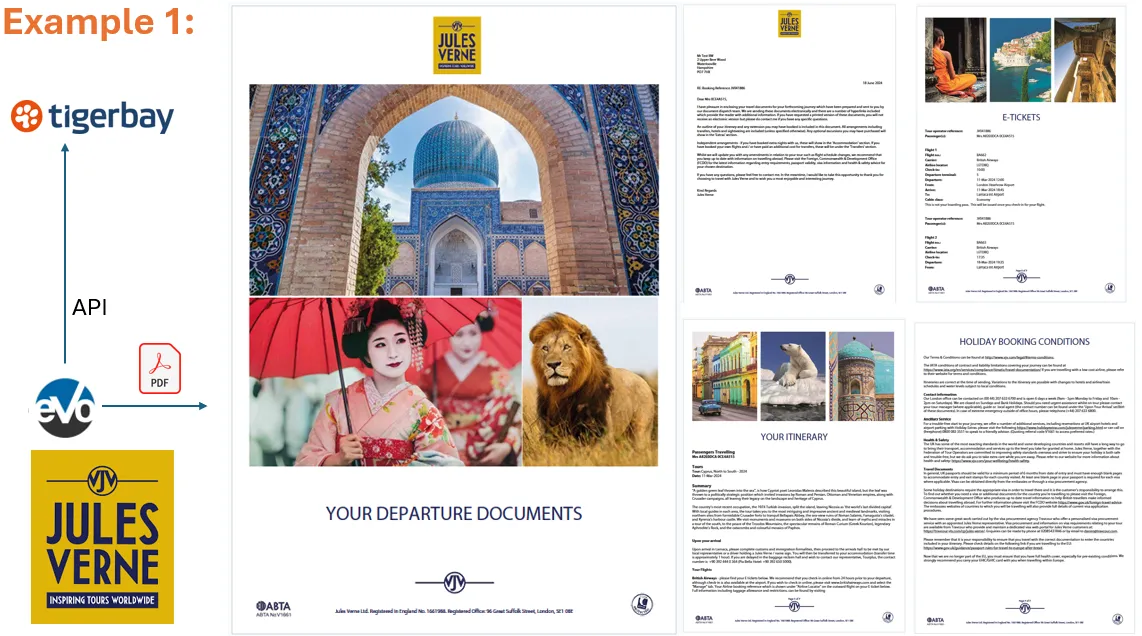
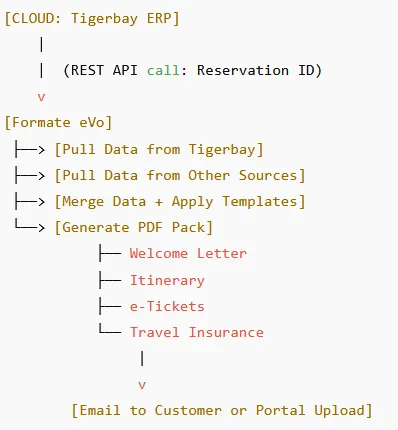
Formate eVo queries the Tigerbay API to automatically retrieve all relevant data for a specific reservation. It then combines this with additional content from non-ERP data sources to produce a comprehensive, customer-focused document pack. This includes a personalised letter, detailed itinerary, e-Tickets, and travel insurance documents—delivered as a polished and professional bundle without any manual intervention.
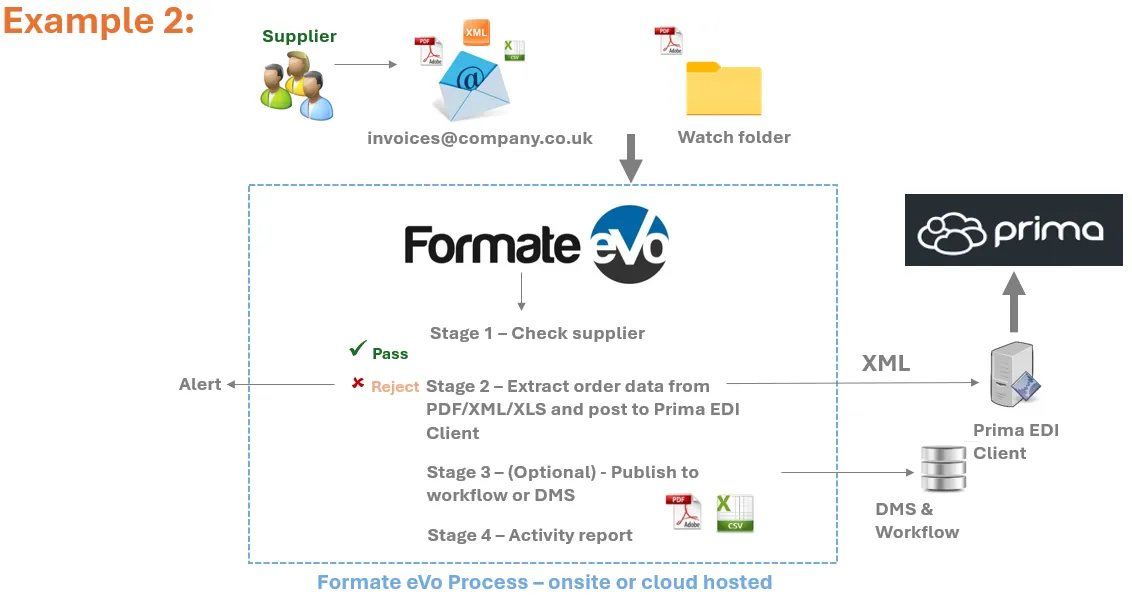
Case Study 2 – Automating Supplier Invoice Processing with Formate eVo
Prima Software, a UK-based provider of cloud-based ERP and ecommerce solutions for the office supplies industry, helps dealers streamline key business processes through automation.
By integrating Formate eVo with their ERP platform, Prima enables their customers to automatically process supplier invoices received via email. PDF invoices are captured, the line-item data is intelligently extracted, and a structured XML file is generated and sent directly to the Prima ERP system for automatic registration.
This seamless process eliminates manual data entry, reduces errors, and allows dealers to focus on more valuable tasks—boosting overall efficiency and productivity.
Case Study 3 – Barcode-Driven Workflow Automation
Many business processes involve the handling of returned documents—such as application forms, signed delivery notes, or approval forms—which often require sorting, indexing, and further action.
With Formate eVo, this process can be fully automated by using barcode or QR code identifiers. Instead of manually indexing documents, Formate eVo scans incoming PDFs or image files, reads the embedded code, and instantly routes the document into the appropriate workflow.
Whether the destination is an email inbox, digital archive, document management system, or another process step, Formate eVo ensures fast, accurate, and hands-free document handling—saving time and reducing errors.

What's Your Application?
In summary, Formate eVo streamlines and automates end to end document workflows for ERP driven businesses—from capturing raw data to delivering polished outputs—all through flexible deployment and easy to use automation tools.
If you have a possible application, we'll be happy to answer any questions, or provide a web demo.
Youtube
LinkedIn